





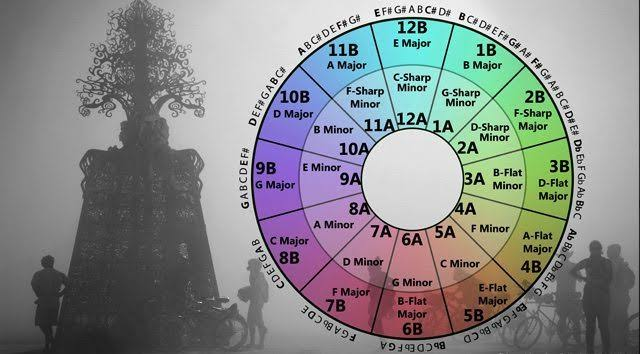
Camelot notation is a simple system that helps DJs and music enthusiasts understand which songs are likely to blend well together. Instead of relying only on traditional musical keys such as C major or A minor, it uses a combination of numbers and letters to make harmonic mixing easier. If you have explored music discovery tools such as TuneBat, understanding Camelot notation can help you make more informed decisions when selecting tracks for a playlist, DJ set, or remix.
The system is especially useful when transitioning between songs with different tempos, energy levels, and musical styles. By learning how Camelot numbers work, you can identify compatible tracks more quickly and create smoother transitions without needing advanced music theory knowledge.
What Is Camelot Notation?
Camelot notation is a system for organizing musical keys into a format designed for harmonic mixing. It is closely associated with the Camelot Wheel, a tool that arranges musical keys in a circular pattern so that compatible keys are easy to identify.
Each position on the wheel has a number from 1 to 12 and a letter, either A or B. The numbers represent positions around the wheel, while the letters distinguish minor and major keys.
- A represents a minor key.
- B represents a major key.
- Numbers 1–12 identify the key’s position on the wheel.
For example, 8A represents A minor, while 8B represents C major. Although these are different musical keys, they share the same key signature and can work well together in many musical arrangements.
The main purpose of Camelot notation is to make key compatibility easier to understand at a glance. Instead of memorizing every major and minor key relationship, DJs can use a short code to identify potential mixing opportunities.
How Does the Camelot Wheel Work?
The Camelot Wheel arranges musical keys in a circle, allowing users to identify common harmonic relationships.
Tracks with the same Camelot code are generally compatible because they share the same musical key. Tracks in adjacent positions on the wheel can also create smooth transitions, depending on the melodies, basslines, and arrangements involved.
For example, a DJ playing a track labeled 8A might consider another track labeled 8A, 7A, or 9A. These options are common starting points for harmonic mixing.
The wheel also supports transitions between major and minor keys. Moving from 8A to 8B is a familiar example because both codes represent related keys. Such a transition can change the emotional character of a mix without introducing a completely unrelated harmonic foundation.
However, these relationships are guidelines rather than strict rules. Two tracks with compatible keys may still clash if their melodies, rhythms, or bass frequencies compete with one another.
Why Is Camelot Notation Useful for DJs?
Harmonic mixing can make a DJ set sound more cohesive. When two songs use compatible keys, their melodies and harmonies are less likely to produce unwanted dissonance during a transition.
Camelot notation makes this process easier by reducing the need to translate traditional musical keys every time you choose a new track.
1. Creating smoother transitions
A transition between two songs involves more than matching their beats. If both tracks contain prominent melodies, chords, or sustained notes, incompatible keys may create an unpleasant sound when they overlap.
Using Camelot codes helps you identify tracks that are worth testing together before adding them to your set.
2. Building playlists with a consistent mood
Musical keys can influence how a sequence of songs feels, although tempo, instrumentation, rhythm, and production also contribute to the overall mood.
A DJ can use Camelot notation to organize tracks into groups that are easier to combine. For instance, a playlist organized around a particular key family may help maintain musical continuity while gradually changing energy levels.
3. Finding compatible songs faster
When managing hundreds or thousands of tracks, manually checking traditional keys can become time-consuming. Camelot notation provides a practical shortcut.
You can scan your music library, identify promising combinations, and focus your listening time on testing transitions instead of repeatedly researching key relationships.
How to Read Camelot Codes
Understanding a few basic examples will help you start using the system.
| Camelot code | Musical key | Common mixing options |
|---|---|---|
| 8A | A minor | 7A, 8A, 9A, 8B |
| 8B | C major | 7B, 8B, 9B, 8A |
| 9A | E minor | 8A, 9A, 10A, 9B |
| 9B | G major | 8B, 9B, 10B, 9A |
| 10A | B minor | 9A, 10A, 11A, 10B |
These examples illustrate common starting points rather than guaranteed successful combinations. The actual result depends on the musical material and how the tracks are mixed.
Same number, same letter
Matching codes are usually the simplest option. For example, two tracks labeled 9A share the same identified key, making them useful candidates for harmonic mixing.
Move one number forward or backward
Moving between adjacent numbers while keeping the same letter is another common approach. A transition from 9A to 10A, for instance, may work well because the keys have a useful harmonic relationship.
You can also move from 9A to 8A. Both directions are worth exploring, depending on the musical arrangement.
Change the letter while keeping the number
Switching from 9A to 9B changes between related minor and major keys. This can create a different emotional feel while maintaining a close harmonic relationship.
For DJs who want to move from a darker track to a brighter one, this option may be particularly interesting.
How Can You Use Camelot Notation With TuneBat?
Music discovery and analysis tools can help you explore information about tracks and artists, including musical characteristics that may support playlist planning. When using TuneBat or another music analysis resource, it is helpful to understand how the displayed key information relates to the Camelot system.
Start by identifying the musical key of a track. If a tool provides a traditional key rather than a Camelot code, use a reliable key-to-Camelot conversion chart to find its corresponding position.
Next, identify a few songs that share the same code or occupy adjacent positions on the wheel. Listen to their choruses, instrumental sections, and outros to determine whether they complement one another.
Do not assume that every track with a compatible code will automatically work in a DJ set. Key detection can be imperfect, and some songs contain chord changes or melodies that make their harmonic structure more complex than a single code suggests.
For additional background on musical keys and their relationships, the Ableton Learning Music resource offers interactive lessons that can help develop your understanding of music fundamentals.
Does Camelot Notation Guarantee a Perfect Mix?
No. Camelot notation is a useful planning tool, but it cannot replace listening skills or practical mixing experience.
Several factors influence whether two songs sound good together.
Tempo compatibility: Songs with very different tempos may require beatmatching or tempo adjustment. Even harmonically compatible tracks can sound awkward if their rhythms do not align naturally.
Musical arrangement: A transition between two instrumental sections may sound smooth, while overlapping two strong vocal melodies could create confusion.
Bass frequencies: Two basslines playing simultaneously may compete for space, making the mix sound muddy. Equalization and careful track selection can help.
Energy and mood: A technically compatible transition might still feel wrong if one song is calm and atmospheric while the other is aggressive and energetic.
Key detection accuracy: Automated analysis tools can occasionally misidentify a track’s key, particularly when a recording contains ambiguous harmony, unusual tuning, or significant modulation.
For these reasons, use Camelot notation to narrow down your choices, then trust your ears to make the final decision.
Common Mistakes to Avoid When Using Camelot Codes
Beginners sometimes treat the Camelot Wheel as a strict set of rules. This can limit creativity and lead to predictable playlists.
One common mistake is refusing to mix tracks with different codes. Although matching or neighboring keys are useful starting points, songs outside these relationships can still work together when the transition is carefully arranged.
Another mistake is focusing exclusively on harmonic compatibility. A good DJ set also needs rhythm, phrasing, energy management, and thoughtful track selection. Matching the keys will not fix a poorly timed transition.
It is also important to avoid relying blindly on automatically detected key information. When a transition sounds uncomfortable despite apparently compatible codes, check the tracks themselves rather than assuming your ears are wrong.
Finally, experiment with different combinations. A transition that looks unusual on the wheel may sound excellent when the first track’s melody finishes before the second track begins.
Conclusion
Camelot notation makes harmonic mixing more accessible by representing musical keys with numbers and letters. The system helps DJs identify compatible tracks, plan smoother transitions, and organize music libraries without needing to memorize every traditional key relationship.
When exploring music with TuneBat and similar tools, use key information as a starting point for discovering songs that may work well together. Learn the basic Camelot Wheel relationships, experiment with neighboring keys, and pay attention to tempo, phrasing, and energy.
Ultimately, the most effective approach combines technical information with careful listening. Camelot notation can guide your choices, but creativity and practice are what turn those choices into an engaging musical experience.